
Only the texts your club actually needs.
Text messages are optional, off by default, and only ever sent to a number someone typed in themselves. Here's exactly how opting in works, what we send, and how to stop.

How you opt in
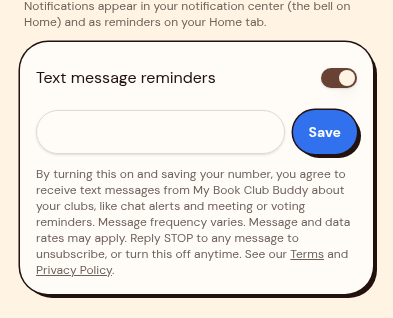
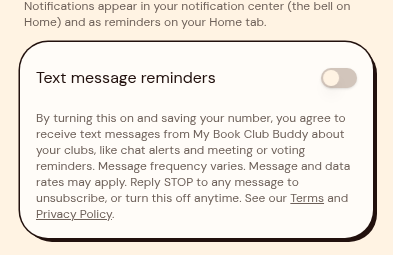
Nothing is sent until you turn it on. Sign in, open Profile, then Notification settings, and switch on Text message reminders. Type your own mobile number and tap Save.
The consent you agree to
By turning this on and saving your number, you agree to receive text messages from My Book Club Buddy about your clubs, like chat alerts and meeting or voting reminders. Message frequency varies. Message and data rates may apply. Reply STOP to any message to unsubscribe, or turn this off anytime. See our Terms and Privacy Policy.
This wording appears on the opt-in screen itself, right under the phone number field, before you save.
By turning this on and saving your number, you agree to receive text messages from My Book Club Buddy about your clubs, like chat alerts and meeting or voting reminders. Message frequency varies. Message and data rates may apply. Reply STOP to any message to unsubscribe, or turn this off anytime.
The opt-in screen, shown here with a sample number.
The actual opt-in screen
Straight from the app, with the sample number removed. Nothing is texted until you switch this on and save a number yourself.
What we text
Transactional club updates only — never promotions, never marketing, never sold to anyone. Each one mirrors a notification you'd see in the app.
Voting
My Book Club Buddy: Voting is open in your book club.
Reply STOP to opt out.
Gatherings
My Book Club Buddy: A new gathering was scheduled for your book club.
Reply STOP to opt out.
Club chat
My Book Club Buddy: New message in your book club.
Reply STOP to opt out.
Each text is one short, fixed sentence naming the kind of update — voting, a gathering change, a new club message, results, a new pick or a clubmate birthday — and only the kinds you leave switched on in your notification settings. Texts never contain what a member typed in chat, a member's name, a club name, a book title or a gathering title, and never a link or a phone number. All of that stays inside the app.
Opting out
- Reply STOP to any message and you're unsubscribed from texts right away. Reply HELP for help.
- Or switch Text message reminders off in Profile → Notification settings. No reason needed, and nothing else about your account changes.
- Turning it off stops all future texts. You can turn it back on whenever you like.
Message frequency varies with your club's activity. Message and data rates may apply. Carriers are not liable for delayed or undelivered messages. Questions? Email hello@mybookclubbuddy.com.

Ready for your next read?
Set up your club in a couple of minutes — picks, votes, chat and the whole night, sorted.